The mitsumonoAI Field Adoption Model, Tested in Fukui's Tourism DX Demonstration Project on a Generative AI Model Using FTAS
- From September 2025 to January 2026, as part of a Japan Tourism Agency FY2025 demonstration project, basicmath provided the generative AI suite mitsumonoAI to tourism businesses in Fukui Prefecture, and registered users far exceeded the target of 100.
- In measurements at the 13 most active companies, a railway operator cut thumbnail creation from one week to 30 minutes (a reduction of more than 99%), and a lodging business cut review reply time to between one-half and one-third.
- Because ongoing use was limited, we combined operational design such as 41 tiered seminars, one-on-one lectures and hands-on support, and organized it as a field adoption model that overcomes the barriers of connection, dialogue and application.
- 100+
- Registered users (far above the target)
- 41
- Beginner, intermediate and advanced seminars
- 99%+
- Time saved on thumbnail creation (one week to 30 minutes)
- 35+
- AI agents and workflows in mitsumonoAI
The main driver of results was “designed generative AI.” The key to adoption was “operational design.”
“Honestly, I didn’t know what to do.”
These are the words of a staff member at a public-private (third-sector) company that introduced mitsumonoAI in Fukui Prefecture’s tourism DX demonstration project. Research tasks took an enormous amount of time, and even after more than a full day, the staff member still “didn’t know where to start.”
From September 2025 to January 2026, basicmath, as a member of the Fukui Prefecture Tourism DX Consortium, ran a demonstration project that provided the generative AI suite mitsumonoAI to local tourism businesses. It was part of an effort selected for the Japan Tourism Agency’s FY2025 “Demonstration Project for Regional Revitalization Models through Tourism DX.” The demonstration project showed that generative AI can go beyond being a simple efficiency tool: as a thinking partner, it can broaden people’s view on the ground, spark creativity and build confidence.
Tourism DX case study (kanko-dx.go.jp, Japanese)
Background: Why Fukui’s Tourism Businesses Needed Generative AI
Selected Four Years in a Row, with International Attention
The initiatives led by the Fukui Prefecture Tourism DX Consortium have been selected for Japan Tourism Agency programs four years in a row. In FY2025, the consortium was selected for the “Demonstration Project for Regional Revitalization Models through Tourism DX” with a “generative AI model using FTAS.”
This ongoing work has also drawn international attention. The outcome document “AI and Tourism” from the G7 Tourism Ministers’ Meeting held in November 2024 featured Fukui Prefecture’s tourism DX as a leading example.
An AI-Powered Local Success Model Featured in a G7 Policy Document: Fukui Tourism DX: The work of the Fukui Prefecture Tourism DX Promotion Consortium was introduced as Japan’s only leading example in the G7 and OECD policy document “Artificial Intelligence and Tourism.”
Tourism Data That Was Not Being Fully Used
In Fukui Prefecture, led by the prefectural tourism federation, highly valuable data for business strategy, such as lodging reservation status in the prefecture and visitor survey results, has been accumulated in FTAS, the prefecture’s own DMP (data management platform).
Even so, many businesses on the ground were not making full use of this data. Behind this were issues such as a lack of expertise, no dedicated staff and limited time, and a gap between analysis results and daily work. We examined these issues through the demonstration project below.
The “Three Barriers” Businesses Faced
Interviews before the demonstration project revealed three barriers that businesses commonly faced regardless of industry. This was also the starting point for what we later organized as the field adoption model (connection, dialogue, application).
Barrier 1: Time and resources “Routine tasks that take people and time, such as image production that requires specialized skills, time-consuming review replies, and summarizing complex manuals”
At a railway operator, a staff member with no image editing skills needed a week to create a thumbnail. At a lodging business, each review reply took 10 to 15 minutes, and writing polite responses alone consumed an enormous amount of time.
Barrier 2: Going from zero to one “Running out of ideas for taking the first step, such as developing new menus, planning projects or considering PR events, which stalls work”
A city hall employee said, “Coming up with plans from scratch took time, and our perspective tended to be narrow.” They spent a lot of time researching other municipalities’ plans but struggled to adapt them to their own region.
Barrier 3: Objectivity “Isolation in decision-making: worrying whether your own thinking is right, wanting an objective opinion, having no one to talk to who can deepen the discussion”
A manufacturer told us, “Even when I share my opinion, some people say ‘that’s just your personal impression,’ and the discussion stops.” In small organizations especially, there were few chances to consult experts, and there were many moments of uncertainty.
What Is mitsumonoAI? A Generative AI Suite Designed with Specialized Functions to Break Through the Three Barriers
To address these issues on the ground, we provided mitsumonoAI, a generative AI suite that uses several of the latest models, including OpenAI, Claude, Gemini, Grok and Perplexity, and includes more than 35 AI agents and workflows (specialized functions). It offers a wide entry point into daily work and is designed to support a broad range of tasks, not only digital marketing but also bouncing ideas off the AI, business planning, research and analysis, and many kinds of content generation.
mitsumonoAI official site: A generative AI tool that speeds up daily work with multi-LLM chat, AI agents and templated business workflows.
The Design Philosophy of mitsumonoAI
In developing mitsumonoAI, what we valued most was that “anyone can use it right away, even AI beginners who don’t know technical terms.”
Many generative AI tools require prompt engineering skills to use effectively. But it is not realistic to ask busy frontline staff to spend time learning that. So we avoided technical terms such as “model” and “prompt” entirely and prepared agents and workflows organized by purpose, building a system where anyone can easily get the results they need.
To solve the first hurdle of using AI, “what should I ask and how,” many functions let the AI understand what it needs and produce high-quality output when users simply fill in the fields shown on screen (for example, “your website URL” or “ingredients you want to use in a recipe”), instead of writing expert instructions from scratch.
Four Categories and More Than 35 Specialized Functions
mitsumonoAI groups business tasks into the following four categories and offers specialized functions for each.
Content creation (automation and generation assistants) Review analysis and reply generation, file analysis, image generation (supporting several of the latest models, such as nano-banana-pro), social media posts and email copy, blog posts
Planning and ideas (idea generation engine) Recipe Development Chef, SNS Planner, planning support, new business idea generation, marketing measure proposals
Analysis and research (strategic dialogue partner) Brainstorming with Sensei AI, SWOT analysis, persona creation, competitor analysis, trend research
Documents and manuals Manual summaries, FAQ creation, internal newsletters, presentation outlines, meeting minutes
A Special Presence: Tourism DX Advisor “Sensei AI Masanori Satake”
The function that drew the most attention in this demonstration project was “Sensei AI Masanori Satake,” which incorporates the knowledge of Masanori Satake, destination development manager at the Fukui Prefecture Tourism Federation (a public interest incorporated foundation). The point is that it is not simply a substitute for hands-on support; it builds the experience of consulting an expert into the product as a function. In other words, results did not come because a person provided support; the system itself provides a way to consult on tasks that need advice and brainstorming.
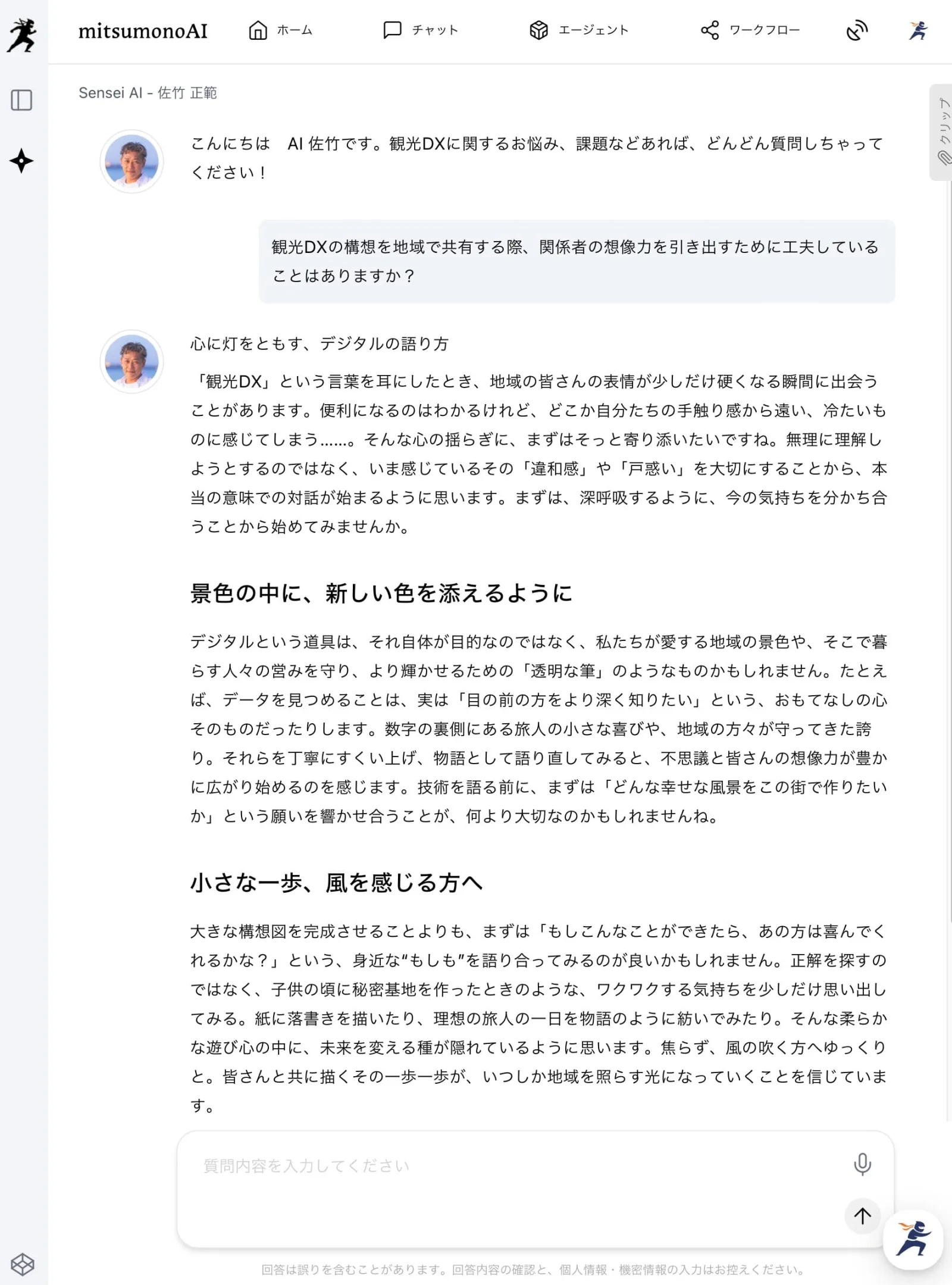
The limits of conventional expert consultation Until now, getting expert advice on tourism DX mostly meant consulting within set times, such as by making an appointment with Mr. Satake or attending a workshop. Naturally, what could be discussed and when were limited, and there was no way to respond when someone “wants to ask right now” or “suddenly had a question in the middle of the night.”
Automating consulting with AI By turning consultation into AI, we created an environment where users can consult and brainstorm as much as they like, whenever they want, without being limited by time or by who is available.
What we cared about most in the design: reproducing the person In designing Sensei AI Masanori Satake, we focused most on having it answer in a way that conveys Mr. Satake’s own atmosphere, values and personality, not just presenting his knowledge as answers.
Why this mattered In tourism DX, issues and solutions differ by region, and there is not always a single right answer. Rather than presenting uniform correct answers, we aimed for an AI that stays close to the user’s issues, works alongside them, and offers insights and inspiration.
Logs from the demonstration project period (October to December) showed 6.9 to 8.0 weekly sessions, meaning consultation and brainstorming happened more often than the target of 2. On the other hand, we did not communicate concrete use cases and benefits clearly enough, and promoting use remained a challenge.
Based on this experience, we plan to consider a rollout focused on users whose needs match, such as staff who lead tourism DX.
Technical Features: Ensuring Safety with Guardrails
Information management and security are unavoidable issues when using generative AI at work. mitsumonoAI implements its own guardrail function to protect personal and confidential information. It has obtained ISMS certification (ISO/IEC 27001:2022), an international security standard, providing an environment where businesses can use it with confidence.

Early Challenges: Three Barriers Staff Faced in Making AI Their Own
The goal of the demonstration project was not to introduce AI itself, but to make AI a “partner” that businesses can use in daily work. Right after introduction, however, many businesses ran into the barriers below. These are the core of the field adoption model (connection, dialogue, application).
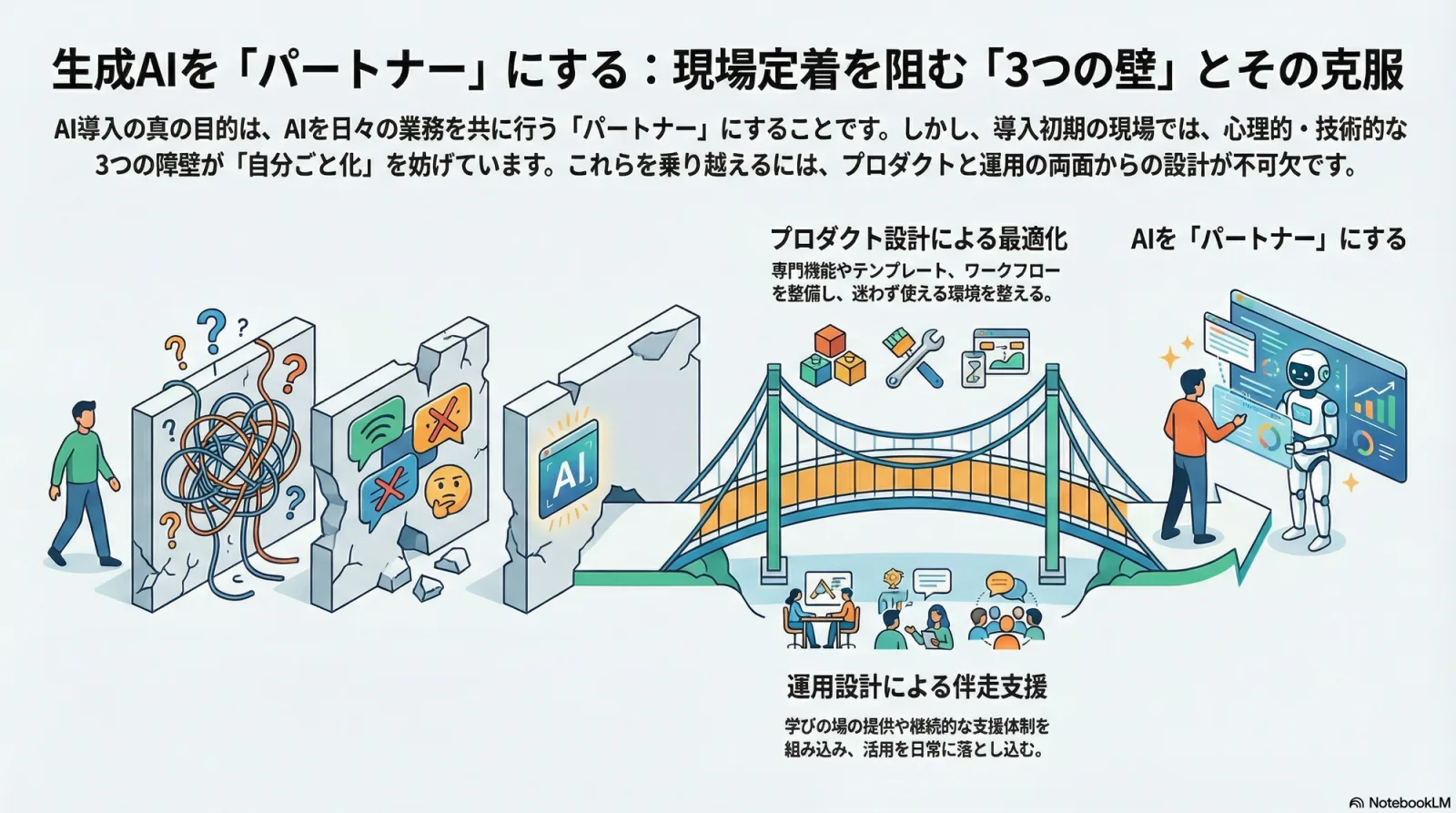
1. The Connection Barrier: Not Knowing How AI Relates to My Work
The first barrier was not knowing how to link the new concept of AI to the daily work in front of them. This psychological distance showed up as confusion: “There are lots of functions, but I don’t know where to start.”
Voices from participants
- “There are so many functions that I sometimes wasn’t sure which AI function to use for my work issue.” (DMO staff member)
- “Without guidance like ‘if you have this kind of problem, use this function,’ I felt I couldn’t choose what to use.” (Government employee)
2. The Dialogue Barrier: The AI Doesn’t Get My Intent
Next came issues in talking with the AI. Some people tried to use AI the same way as a web search and were confused by the way generative AI conversations work. Getting a different answer to the same question every time, or getting a result different from what an instruction meant, created the feeling that “the AI doesn’t do what I intend.”
Voices from participants
- “I’d like to know why, when I ask the AI to make a correction, it changes parts I didn’t mean to change.” (Tourism business)
- “Even when I ask the same question, I get a different answer every time, and the conversation sometimes drifts.” (Lodging business)
3. The Application Barrier: Not Knowing How to Turn AI Answers into Next Actions
The last barrier was that even with a high-quality answer from the AI, people did not know how to use it in concrete business activities.
Voices from participants
- “The agent functions produce results, but it’s unclear how to use those results to move work forward.” (Government employee)
- “I want to use AI in our product development, but without the knowledge, I sometimes struggled with how to judge the AI’s answers and move to the next action.” (Retail business)
These three barriers are fundamental issues anyone faces when bringing the potential of generative AI into the concrete context of daily work. That is why this demonstration project combined product design (specialized functions, input fields, templates and workflows) with operational design (places to learn, guidance, hands-on support and ongoing support) to model how to overcome them.
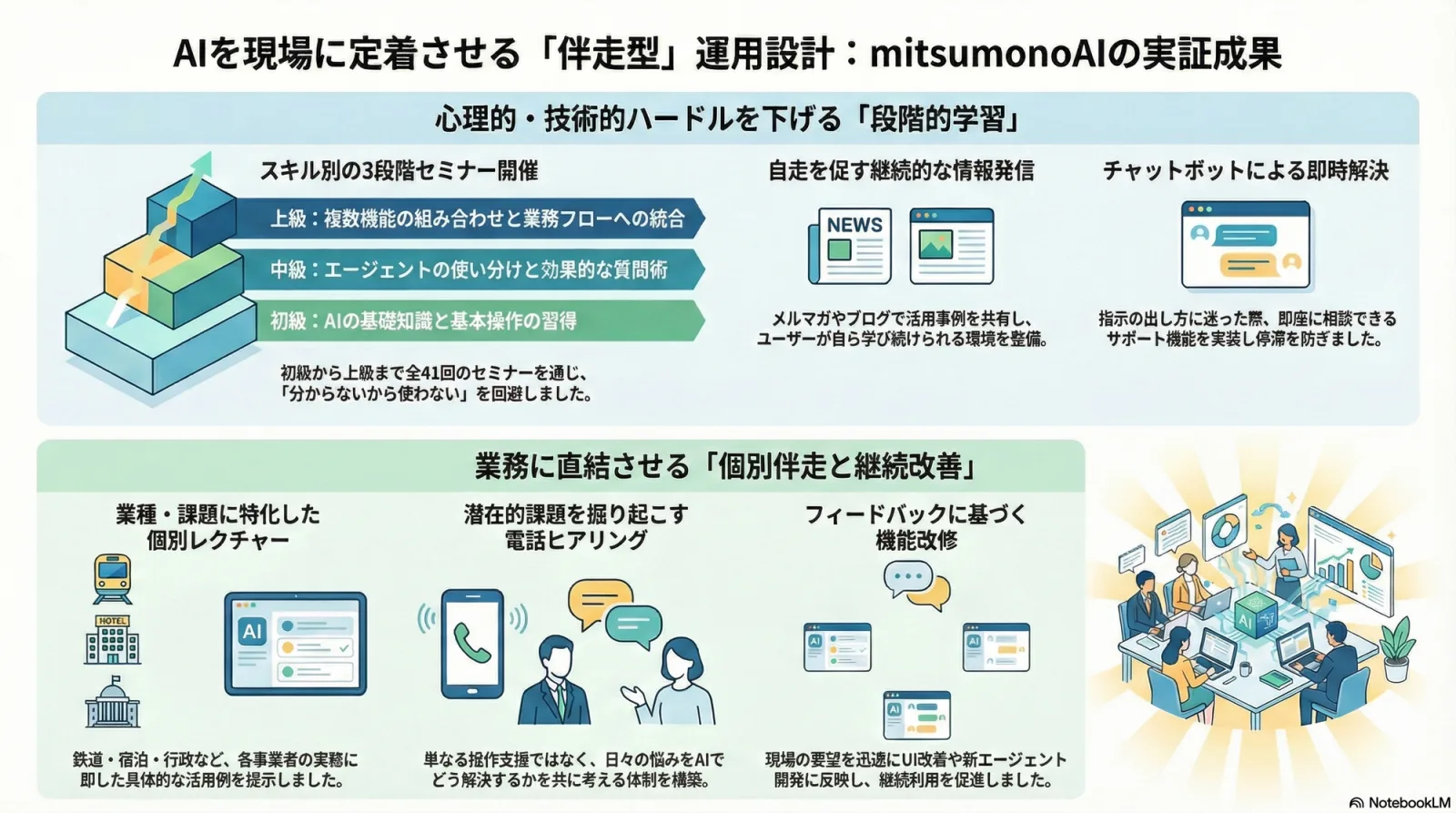
Demonstration Project Overview: Operational Design to Unlock mitsumonoAI’s Functions in the Field (Hands-On Support, Learning and Ongoing Support)
Registered users far exceeded the target of 100 or more, but the number of users who kept using the tool was limited. This result taught us an important lesson.
“Just providing a system does not make it stick.”
Here, “does not stick” is not about whether the tool is good or bad. It means that without a path over the connection, dialogue and application barriers that arise early on, any tool ends up unused. So in this demonstration project, we combined tiered learning opportunities, one-on-one support and ongoing support as a support design that goes beyond explaining how to operate the tool.
Measure 1: A Tiered Seminar Program
We added beginner, intermediate and advanced seminars on how to use the tool, which had not been planned at first, and held 41 seminars in total.
- Beginner seminar: What AI is, and the basic operation of mitsumonoAI
- Intermediate seminar: Choosing the right agent, and how to ask effective questions
- Advanced seminar: Combining multiple functions, and building them into workflows
By offering step-by-step learning matched to participants’ skill levels, we avoided situations where people “don’t use it because they don’t understand it.”
Measure 2: One-on-One Lectures
For the 13 companies we interviewed, we asked whether they wanted individual seminars and provided fully customized sessions to those who did. Explanations tailored to each business’s issues and questions made clear “how we can use it in our work,” which led to more effective use of AI.
For example, we gave lodging businesses a lecture focused on handling reviews, railway operators a session on combining image generation with social media posts, city hall employees guidance on combining planning with SWOT analysis, and tourism DX staff a method for strategic brainstorming with “Sensei AI Masanori Satake,” optimizing support for each type of work.
Voices from participants
- “The group seminar was aimed at commercial businesses, but the individual seminar afterward gave us information directly tied to our work, which was useful.” (Government employee)
- “I hadn’t attended the seminars, so I didn’t know what each function was for, but in the individual interview I was given concrete examples of solving problems, which made the tool’s potential and value easier to understand.” (Lodging business)
Measure 3: Hands-On Support Through Phone Interviews
We held regular phone interviews with some businesses. Beyond how to use the tool, we focused on hands-on support: carefully listening to underlying issues and everyday concerns, and thinking together about how AI could solve them.
Measure 4: Instant Support Through Staffed Chat
So that businesses can ask for help right away when they are stuck, mitsumonoAI includes a chat-based support function. It answers questions such as “I want to do this; which function should I use?” and “what instructions should I give?” so that users don’t stall.
Measure 5: Ongoing Communication
We sent participants a regular email newsletter with news about new functions, use cases and seminar schedules. We also kept publishing blog posts introducing concrete ways to use the tool and shared them as materials for reviewing seminar content later, building a learning environment that lets businesses become self-sufficient.
Measure 6: Continuous Improvement Based on User Feedback
During the demonstration project, we also identified issues and requests through user interviews and kept improving the tool and adding functions.
Main improvements
- Added pre-set questions (so users can see what AI can do)
- Simplified the UI/UX
- Improved error messages
- Faster response times
- Added new agents
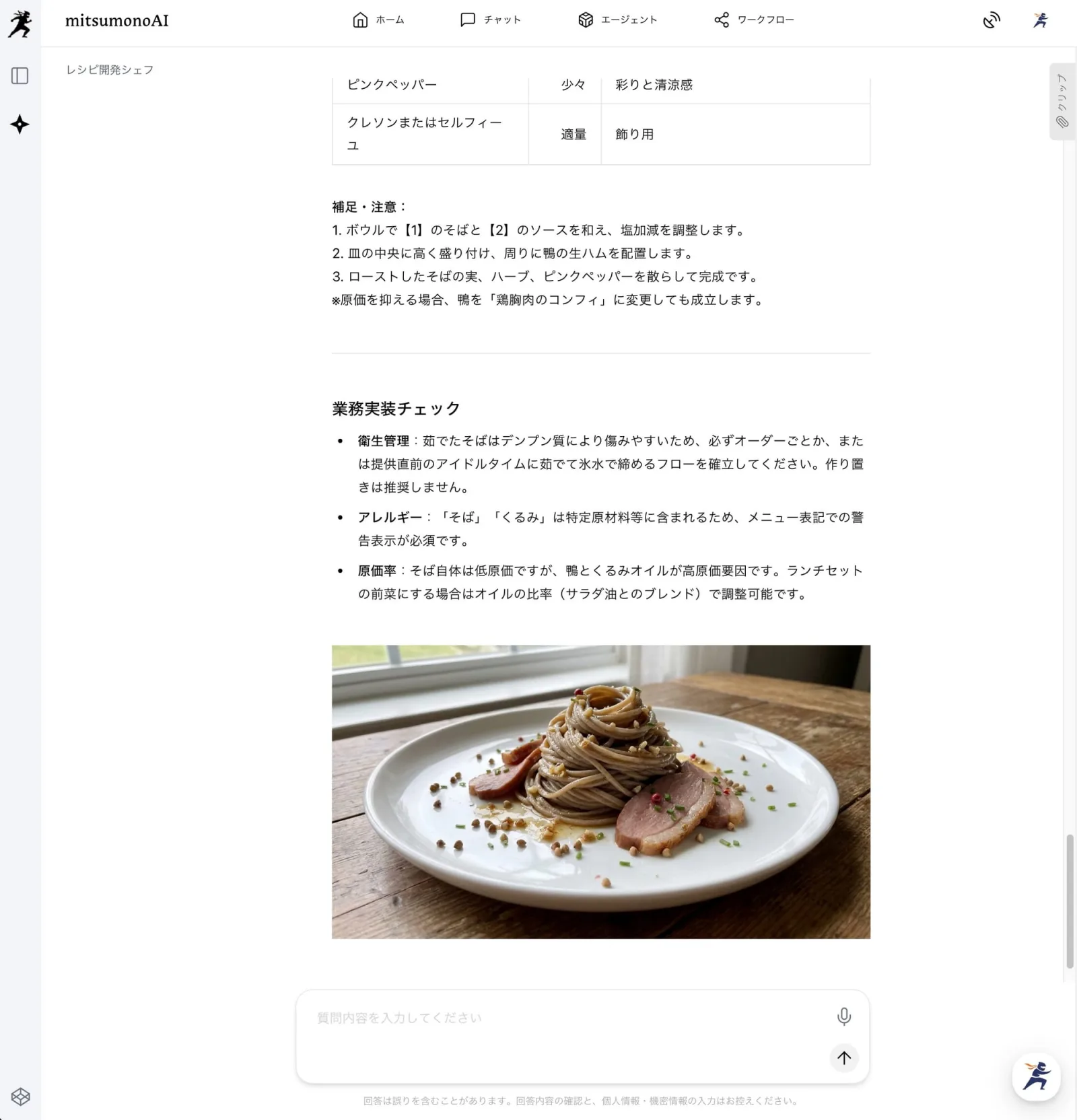
For example, the “Recipe Development Chef” function was strengthened to output reference images at the same time, in response to a request from the field: “We want to see what the dish will be like, including how it is plated.” The feeling that “our opinions are reflected in the product” encouraged continued use.
Tips for Dialogue: Why Putting Things into Words Matters
To overcome the dialogue barrier, our seminars and interviews shared not only basic prompt knowledge but also a more fundamental principle: “The quality of the AI’s answer is proportional to the quality and specificity of the information you give it.” mitsumonoAI is designed to deliver high-quality results even without knowledge of expert instructions. To get the most out of it, however, users must put into words clearly “what they are struggling with and where they want to be,” and convey that to the AI.
Voices from participants
- “I now really feel the importance of ‘the ability to put things into words’ to convey my intent to the AI.” (Railway operator)
- “Brainstorming with the AI helps me sort out what I don’t understand and what I want to ask. It’s useful as preparation before asking other people.” (DMO staff member)
Linking Functions: Turning AI Answers into the Next Move
To overcome the application barrier, we showed concrete workflows that link functions within mitsumonoAI. It is a process of not letting an AI answer end as a single “dot,” but connecting it to the next function to form a “line.”
Example steps: a flow for turning AI analysis into a concrete action plan
- Analyze your company’s strengths and weaknesses with the SWOT Analysis Assistant and save the result with the clip function.
- Launch the Target List Assistant and have it create a concrete picture of target customers based on the clipped content.
- Create a concrete customer profile with the Persona Assistant, then keep talking with the AI to discuss new business ideas.
- “I understood how the flow from SWOT analysis to persona creation improves accuracy and saves time. It was good content, and I wanted to try it.” (Government employee)
- “Collecting research data through web searches and then loading it into the File Analysis Assistant for analysis was a combined use that made me think, ‘I see.’” (Government employee)
With any function, you can get closer to solving the issue by not stopping at checking the output, but continuing the dialogue with the AI by asking questions and making requests about the result.
- “I went back and forth many times with an AI specialized in lodging on the theme of ‘how can we attract guests?’ I used it by layering questions and answers and digging deeper.” (Lodging business)
- “The first question gets a standard answer, but as I keep asking, I get answers that go deeper and feel original, which I appreciated.” (Government employee)
Results: Dramatic Improvements in Numbers (Up to More Than 99% Time Saved)
The demonstration project ran with more than 100 registered users. Weekly use continued mainly among the staff responsible for the work, and we held detailed interviews with the 13 companies that used the tool most actively to measure concrete effects.
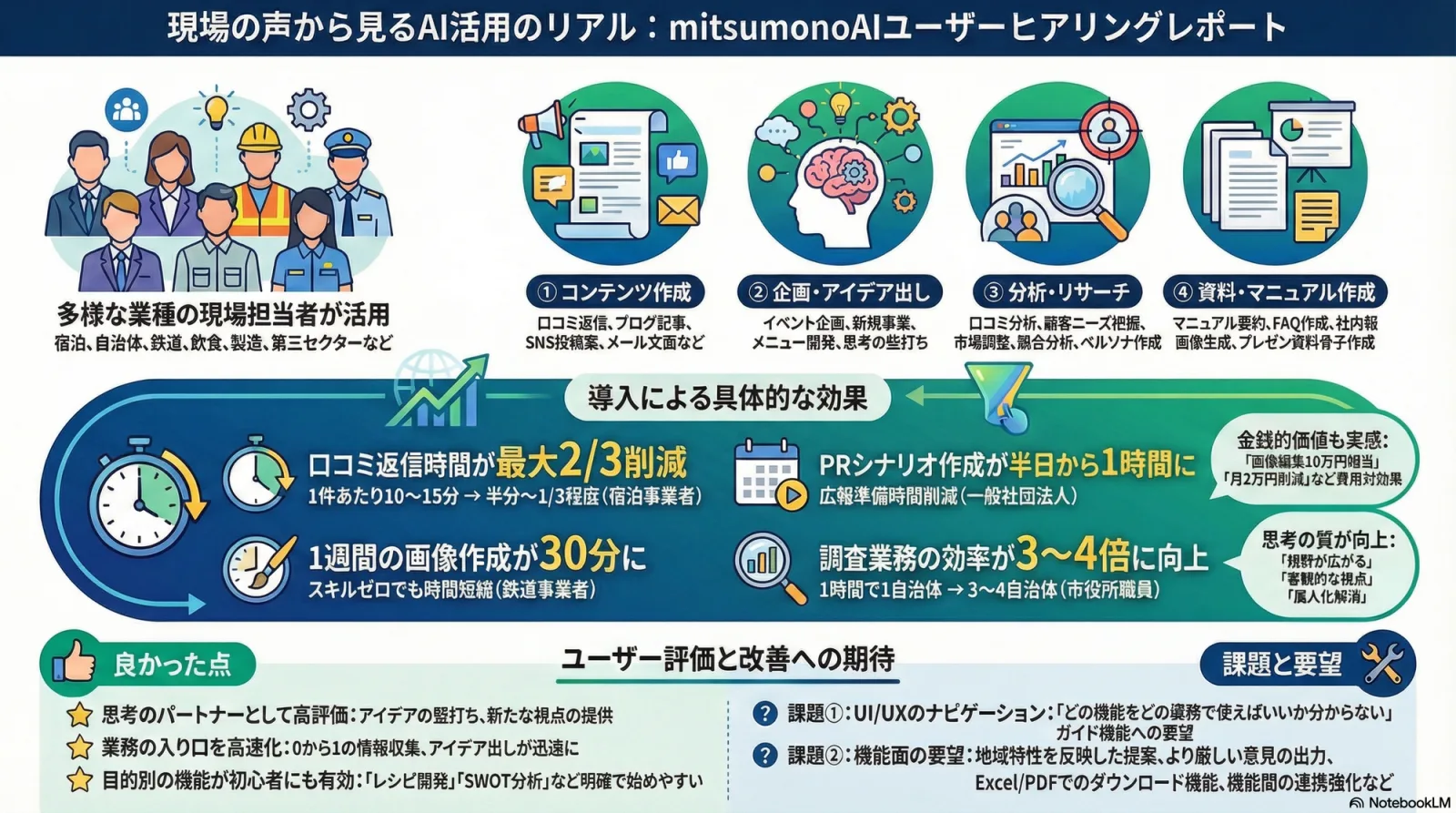
Cases with More Than 99% Time Saved
Railway operator: thumbnail images, one week to 30 minutes
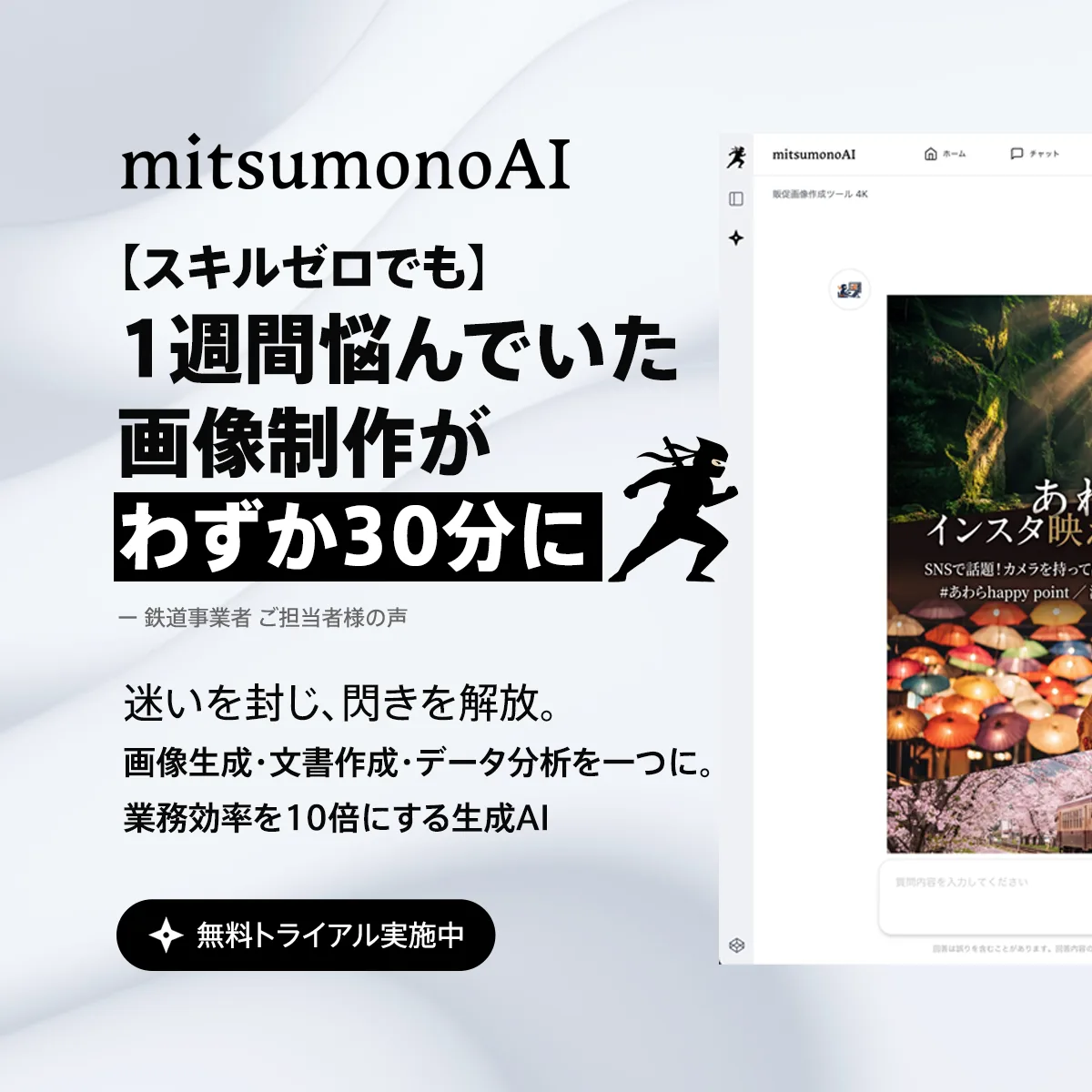
A staff member at a railway operator had said, “With zero image editing skills, it took me a week to make a thumbnail.” With mitsumonoAI’s image generation function, they can now generate high-quality images instantly from text instructions. “It feels like it’s worth roughly 100,000 yen.”
The time saved is more than 99%. In the sense of democratizing design skills, too, the impact was extremely large.
Lodging business: review reply time, 10 to 15 minutes to one-half to one-third
With a chat function that reads a review and generates a draft reply in seconds, staff only need to edit the draft, which saves a great deal of time. Work time dropped dramatically, to between one-half and one-third. Staff also said that the reduced psychological burden of replying to harsh comments let them turn reviews into positive improvement efforts.
Faster Idea Generation
Incorporated association: PR scenario writing, half a day to one hour
PR preparation time dropped sharply, freeing up about 10 hours of work per month. This is equivalent to a cost saving of about 20,000 yen per month (at an hourly rate of 2,000 yen).
More Efficient Advanced Analysis
Public-private company: legal research, more than a full day to about one hour
The staff member went from “researching legal matters from scratch takes more than a full day. (…) I don’t know who to ask” to being able to organize the key points in about one hour. The number of exchanges with the company’s legal counsel also decreased.
More Efficient Research
City hall employee: research efficiency up three to four times
In the city hall employee’s case, the number of municipalities they could research in one hour went from one to three or four.
Monetary Value Was Felt, Too
In the demonstration project, the value users felt, not just time saved, was an important indicator.
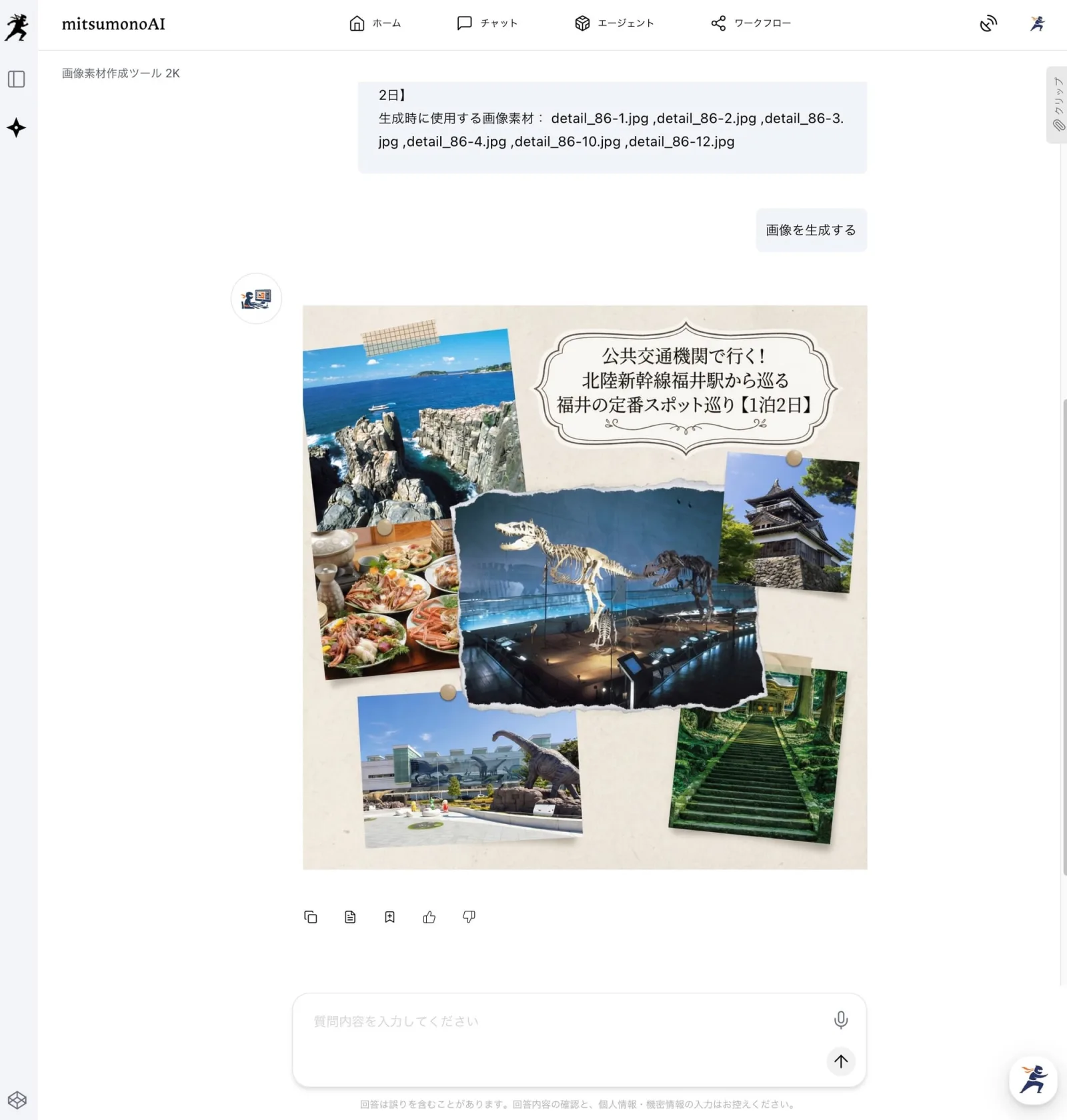
- “Image generation is worth about 100,000 yen.” (Railway operator)
- “A cost saving of about 20,000 yen a month.” (Incorporated association, PR scenario writing)
Concrete monetary figures like these went beyond personal conviction and became persuasive material for getting organizational approval to adopt the tool.
Beyond Efficiency: A Change in Users’ Mindset
What impressed us most in this demonstration project, however, were the changes in users that numbers cannot measure. It did not just cut work time; it changed the way high-value work itself is done.
Deeper Thinking and a Wider View
- “My view has widened, and I’ve gained multiple perspectives, for example noticing that the root of a problem lies somewhere else.” (Lodging business)
- “There were times when I felt AI produced results I couldn’t have produced alone. Because the AI shows me wider options than I would see and perspectives I was missing, beyond my own assumptions, I feel I’m achieving results that go beyond my own field.” (Government employee)
Gaining Confidence and Moving Discussions Forward
- “Objective feedback from the AI has given me confidence in my own opinions.” (Manufacturer)
- “With objective input from the AI, I get information that supports my opinion, and I feel it’s easier to move discussions forward.” (Retail business)
Ending Dependence on Individuals and Standardizing Work
- “Time spent waiting for the one person who knows has gone down.” (Public-private company)
- “(In writing scripts for projects) we eliminated variation in how different members explain things and standardized quality.” (Railway operator)
- “Because AI partly does not depend on individual skills, I realized it can prevent work from depending on specific people and raise skills across the organization.” (DMO staff member)
AI as a Thinking Partner
- “AI has become like someone to consult, a ‘good partner.’” (Railway operator)
From personal interest to organizational strategy
- “Through this demonstration project, a positive trend of ‘let’s use AI’ emerged across the company. Until now, some employees used ChatGPT and similar tools on their own, but the phase is shifting from ‘individual use’ to ‘use by departments and the organization,’ which is an important sign of change.” (Railway operator)
What Is “Omotenashi” in the Age of Generative AI?
Generative AI is advancing quickly, but we do not believe AI will fully replace human work. That is especially true in tourism, whose essential value lies in the experience itself: the emotions travelers feel in a place and their interactions with people. We believe that “AI does not replace omotenashi (Japanese hospitality); it is a tool for creating time so that people can focus on true omotenashi.”
Generative AI makes much of the time spent on back-office work, such as replying to reviews, creating documents and analyzing data, more efficient. Businesses can reinvest the time this frees up in essential, high-value work that only people can do, such as improving the quality of service for each guest and creating more attractive tourism experiences.
Structural issues facing Japan’s tourism industry, such as labor shortages and an aging workforce, will not be solved directly by generative AI. But using AI to raise productivity and creating an environment where limited staff can focus on more creative, higher-value work is the most realistic and effective approach to these issues.
Generative AI and people each using their strengths and working together: this is how Japan’s tourism industry will evolve to a new stage that offers higher-quality experiences.
Toward the Region’s Future
For us, the Fukui Prefecture tourism DX demonstration project was not just a place to test a product. It was a journey with local businesses to explore the value generative AI brings to society.
“AI is becoming a strategic partner that maximizes a business’s potential.”
This is the most important conclusion from the demonstration project.
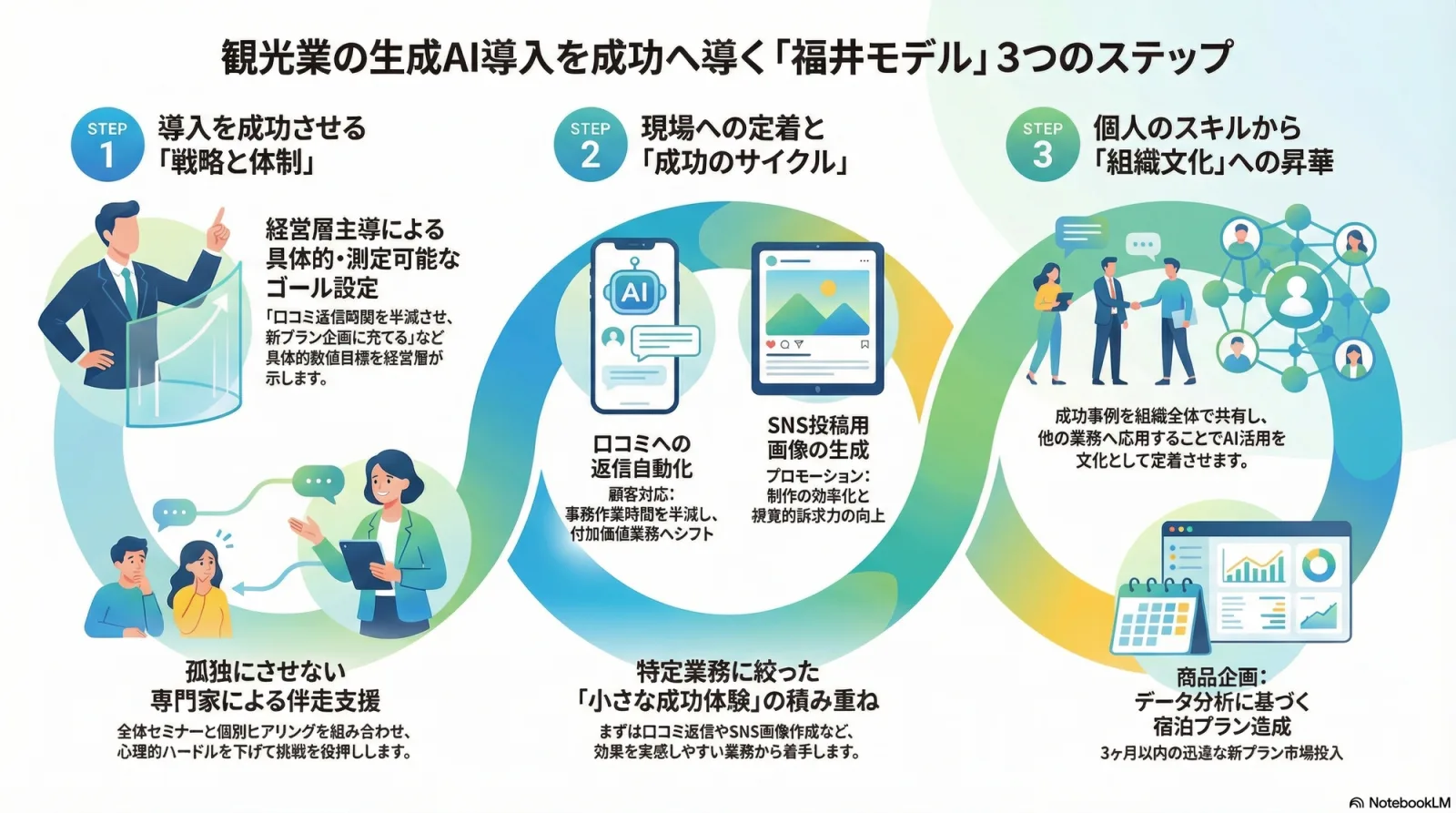
Three Steps to Successful Generative AI Adoption, Learned from the Fukui Model (Product × Operations)
The demonstration project in Fukui Prefecture clearly showed the great potential generative AI brings to tourism. But that success did not come simply from introducing a generation tool. There was generative AI (mitsumonoAI) designed to connect directly to work, there was operational design so that people on the ground could use its functions fully without confusion, and finally there was visualization to link results to organizational decisions. Only when this whole process was in place did the AI take root in the field and lead to ongoing results.
Finally, for all tourism businesses and local government staff considering generative AI, here are the “three steps to success” drawn from our experience in Fukui.
Step 1: Clarify the Purpose, and Set Goals for Why You Are Introducing AI
The most important thing, and the first to work on, is to clarify the purpose: “What are we using AI for?” If you move forward based only on vague expectations such as “it seems convenient” or “apparently it improves efficiency,” the front line gets confused and the AI goes unused.
It is essential to set specific, measurable goals, such as “cut the time spent on daily review replies in half and use the time freed up to plan new experience packages” or “create lodging plans based on data analysis within three months.” This goal setting must always be led by management, not left to the front line. Management itself must understand the usefulness and risks of AI and show the whole organization a clear policy on what the introduction aims to achieve. That is the first step toward success.
Step 2: Secure a Trusted Partner and Places to Learn, with Support That Never Leaves People Alone
Many businesses hit common barriers early on. To get past them, hands-on support from trusted experts and places for ongoing learning are essential.
In Fukui, a tiered support system, in which people learned the basics in group seminars and solved individual issues in individual seminars and interviews, played a major role. Rather than introducing a generative AI tool and leaving the rest to businesses, having a partner they could consult at any time and who would think through concrete solutions with them lowered the psychological hurdle and encouraged them to try using AI.
Step 3: Spread Small Successes, from Individual Skill to Organizational Culture
The last step is to make AI use part of the whole organization’s culture, rather than leaving it as an individual skill. There is no need to try to apply AI to all work from the start. First, focus AI on specific tasks, such as replying to reviews or creating images for social media posts, and build small successes: “I can do this” and “it really saved time.”
Then, by sharing these successes across the organization and applying them to other work, AI use grows from the skill of a few individuals into the culture of the whole organization. The fact that voices saying “we want to advance AI use as an organization” began to rise among Fukui’s businesses is proof that this process worked.
Voices from the Field Create the Future
Finally, we sincerely thank all the businesses that took part in the demonstration project. Your candid feedback, concrete suggestions for improvement, and above all your courage to take on new technology are the driving force behind mitsumonoAI’s evolution.
Three strengths users pointed out
- Highly rated as a thinking partner: Bouncing ideas around and offering new perspectives
- Faster starts to work: Gathering information from zero to one and generating ideas quickly
- Purpose-specific functions work for beginners: Functions such as recipe development and SWOT analysis are clear and easy to start with
Issues and requests users raised
- Issue 1: UI/UX navigation: Users didn’t know which function to use for which task and asked for a guide function
- Issue 2: Feature requests: Proposals that reflect regional characteristics, harsher feedback, Excel/PDF download, stronger links between functions, and more
We value the voices of the field above all. They are the starting point for the best products. What we learned in this demonstration project in Fukui has become a reproducible lesson for any organization considering generative AI, including local businesses and small and midsize companies.
Generative AI is not only for a few leading companies. With the right design and operations, it takes root in the field in any industry. What to leave to AI, and where people create value: the more clearly that line is drawn, the higher the quality of service. That is the reality the Fukui demonstration project showed.
mitsumonoAI wants to be a partner that builds AI use that takes root in the field, together with you.
Q&AQuestions and answers
- What was this demonstration project?
- As a member of the Fukui Prefecture Tourism DX Consortium, basicmath provided the generative AI suite mitsumonoAI to local tourism businesses from September 2025 to January 2026. It was part of an effort selected for the Japan Tourism Agency's FY2025 Demonstration Project for Regional Revitalization Models through Tourism DX.
- What is mitsumonoAI?
- mitsumonoAI is a generative AI suite that uses several of the latest models, including OpenAI, Claude, Gemini, Grok and Perplexity, and includes more than 35 AI agents and workflows. It is designed so that people can use it just by filling in on-screen fields, without technical terms or prompt knowledge.
- How much time did businesses save?
- A railway operator cut thumbnail creation from one week to 30 minutes, a lodging business cut review replies from 10 to 15 minutes each to between one-half and one-third of that, an incorporated association cut PR scenario writing from half a day to one hour, and a public-private company cut legal research from more than a full day to about one hour.
- What barriers did businesses face early on?
- There were three. The connection barrier, not knowing how AI relates to one's own work. The dialogue barrier, not being able to convey intent to the AI. The application barrier, not knowing how to turn AI answers into next actions.
- What does it take to make generative AI stick in the field?
- The Fukui demonstration project points to three steps. Management leads in clarifying the purpose and goals, businesses secure a trusted partner and ongoing places to learn, and small successes are spread across the whole organization.